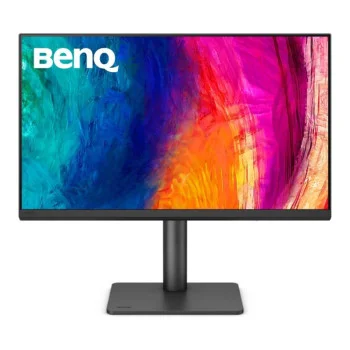
BenQ PD2706QN 27" Quad HD IPS 100Hz 5ms USB-C HDR10 Height Adjustable Designer Monitor with Speakers
Specifications
Performance Benchmarks
Calculated Figures
Calculated from this product's published specifications, not measured in testing. Ranked against other products in this category.
At a glance
BenQ PD2706QN 27" Quad HD IPS 100Hz 5ms USB-C HDR10 Height Adjustable Designer Monitor with Speakers is a 27" QHD (2560 x 1440) monitor with a 100 Hz refresh rate and a 5 ms response time. It is listed at 4 UK shops, cheapest in stock at Overclockers UK for £298.99 (checked 19 October 2026); in-stock prices run from £298.99 to £299.99.
From the retailer
The BenQ DesignVue PD2706QN is a premium 27-inch IPS Quad HD monitor designed specifically for creators and professionals. It features a sharp resolution of 2560 x 1440, offering vibrant colours and detailed images, essential for design work and other creative tasks. With a height-adjustable stand, this monitor prioritises user comfort, making it an excellent choice for long hours of usage in both home and studio environments. What Makes It Different? What sets the PD2706QN apart from typical consumer monitors is its focus on colour accuracy and creator-oriented features. While many monitors may offer similar display sizes or resolutions, this model comes equipped with specialised technologies, such as Low Blue Light and Flicker-Free technology, designed to reduce eye strain during extensive use. Additionally, its built-in speakers add convenience, eliminating the need for separate audio equipment. Positioned within the higher-end spectrum for design purposes, the PD2706QN offers enhanced performance compared to basic monitors, which may not cater specifically to the needs of graphic designers or artists. This monitor is geared towards professionals who require more accurate colour representation and ergonomic flexibility. Performance & Everyday Use With a 100 Hz refresh rate, the PD2706QN ensures smooth visuals, beneficial for tasks that involve motion graphics or video editing. The IPS panel type guarantees wide viewing angles and exceptional colour fidelity, making it ideal for collaborative projects where multiple users view the screen simultaneously. Its response time of 5 ms is sufficient for creative work, though not specifically targeted at high-speed gaming. Connectivity options are robust with HDMI, DisplayPort, USB-C, and USB interfaces, allowing for a seamless connection to various devices, whether you are integrating it into a complex workstation or using it as a standalone monitor.
Where to Buy
We may earn a commission when you buy through these links. It never changes the price you pay, or the order shops are listed in, which is cheapest first.
* Prices may vary and are checked periodically rather than live.
Price History
Price history
Price Intelligence
User Reviews (0)
No reviews yet. Be the first to review this product!
More Gaming Monitors




Embed this price on your site, blog or forum post
Shows the cheapest UK price we have read in the last two weeks, the shop and the date we checked it, and updates on its own. Use the card where HTML is allowed, or the image badge on forums that block iframes.