 1 / 7
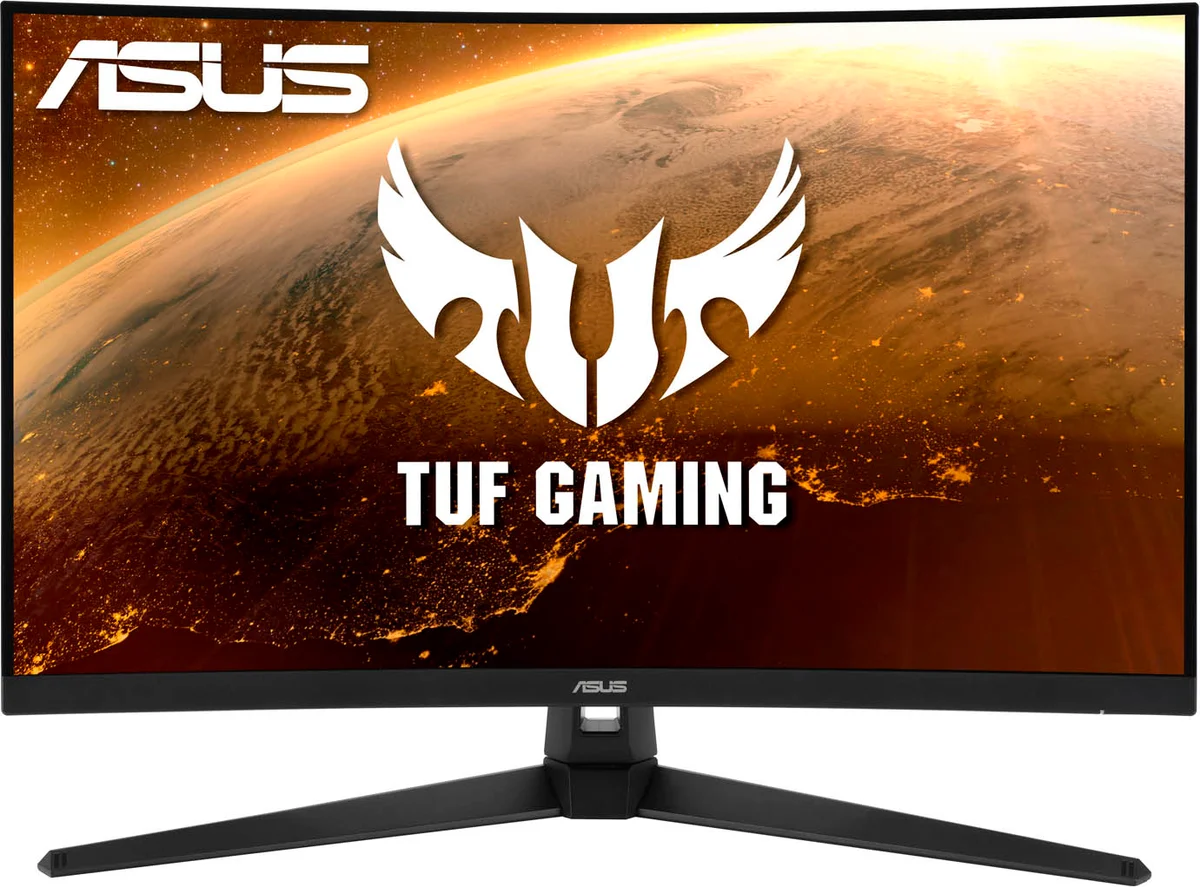
1 / 7ASUS TUF Gaming VG32VQ1BR 31.5 inch Curved Gaming Monitor, VA Panel, QHD 2560 x 1440 Resolution, 165Hz Refresh Rate, FreeSync Premium, HDR10, DisplayPort, 2x HDMI inputs, Speakers
Specifications
At a glance
ASUS TUF Gaming VG32VQ1BR 31.5 inch Curved Gaming Monitor, VA Panel, QHD 2560 x 1440 Resolution, 165Hz Refresh Rate, FreeSync Premium, HDR10, DisplayPort, 2x HDMI inputs, Speakers is a 31.5 " Curved monitor with a 2560 x 1440 pixels resolution, a 165 Hz refresh rate and a 1 ms MPRT response time. It is listed at one UK shop, which is not showing stock right now.
Quick answers
Where is ASUS TUF Gaming VG32VQ1BR 31.5 inch Curved Gaming Monitor, VA Panel, QHD 2560 x 1440 Resolution, 165Hz Refresh Rate, FreeSync Premium, HDR10, DisplayPort, 2x HDMI inputs, Speakers in stock?
One UK shop lists ASUS TUF Gaming VG32VQ1BR 31.5 inch Curved Gaming Monitor, VA Panel, QHD 2560 x 1440 Resolution, 165Hz Refresh Rate, FreeSync Premium, HDR10, DisplayPort, 2x HDMI inputs, Speakers, but none is showing stock right now (checked 27 October 2026).
From the retailer
Please note that this is a C Grade clearance item. C Grade items may have missing accessories or show signs of cosmetic wear. See below for details of this specific item. The price has been reduced to reflect this. All C Grade items are working and have been fully tested. This item is supplied with a Warranty: 6 Month warranty. TUF Gaming VG32VQ1BR TUF Gaming VG32VQ1BR is a 31.5-inch, WQHD (2560x1440), curved display with an ultrafast 165Hz refresh rate designed for professional gamers and those seeking immersive gameplay. Those are some serious specs, but not even the most exciting thing the VG32VQ1BR has in store. Its impressive curved display features a 165Hz refresh rate and Adaptive-Sync (FreeSync™ Premium) technology, for extremely fluid gameplay without tearing and stuttering. 31.5-inch immersive curvature The 31.5-inch WQHD (2560 X 1440) panel of TUF Gaming VG32VQ1BR delivers stunning visuals from all angles with an 1500R curvature that ensures every point is equidistant to your eyes. This contributes to greater viewing comfort — even during extended use —and lets you enjoy a wide viewing angle with less distortion and color shift when gaming and watching movies. 165Hz Refresh Rate TUF Gaming VG32VQ1BR 165Hz refresh rate decimates lag and motion blur to give you the upper hand in first person shooters, racers, real-time strategy, and sports titles. This ultrafast refresh rate lets you play at the highest visual settings and lets you react instantly to what's onscreen — so you'll get that first strike in. EXTREME LOW MOTION BLUR VG32VQ1BR Features the latest ASUS-exclusive Extreme Low Motion Blur technology, which achieves 1ms MPRT to eliminate smearing and motion blur, and makes objects in motion look sharper, so gameplay is more fluid and responsive. Multi HDR Mode Now you can choose from multiple HDR modes to adjust monitor HDR performance based on the current viewing scenario. HDR 10 To more fully realize gamers' vision, TUF Gaming VG32VQ1BR is compatible with industry-standard HDR10 high dynamic range for color and brightness levels that exceed the capabilities of ordinary monitors. Rich connectivity Extensive connectivity options, including, DisplayPort(v1.2), HDMI (v2.0), Earphone Jack support a wide array of multimedia devices. Ergonomic design With an ergonomically-designed stand, TUF Gaming VG32VQ1BR provides tilt, swivel so you can easily find your ideal viewing position. The display is also VESA-compatible for wall mounting.
Where to Buy
We may earn a commission when you buy through these links. It never changes the price you pay, or the order shops are listed in, which is cheapest first.
* Prices may vary and are checked periodically rather than live.
Price History
Price history
Price Intelligence
User Reviews (0)
No reviews yet. Be the first to review this product!
More Gaming Monitors



Embed this price on your site, blog or forum post
Shows the cheapest UK price we have read in the last two weeks, the shop and the date we checked it, and updates on its own. Use the card where HTML is allowed, or the image badge on forums that block iframes.